LG 65" OLED evo C6 4K Smart TV (2026) Review 2026
The 65-inch C6 is the size the labs tested. RTINGS, Tom's Guide, TechRadar, Expert Reviews and T3 all tested this size, so nearly every number you read about the C6 describes this TV. The verdict is consistent: very bright for its panel type, superb for gaming, glossy enough to mirror a lamp.
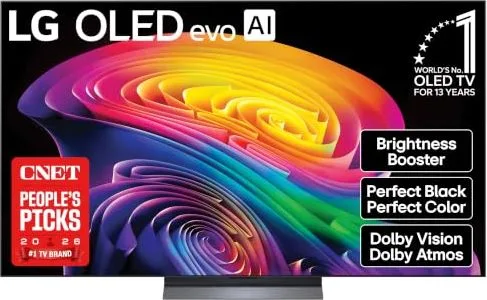
The 65" C6 is the all-round OLED for a dim or mixed-light room: RTINGS calls it a fantastic choice for gaming, with incredibly low input lag and four full HDMI 2.1 ports. The catches are stutter in slow pans and a glossy screen that struggles opposite bright lights.
Which C6 Is This?
This page covers the 65-inch C6, model OLED65C6PUA. It shares its OLED-EX panel, alpha11 Gen3 processor and Brightness Booster with the 55-inch C6; RTINGS says its 65-inch results apply to both. The 42-inch C6 skips Brightness Booster and is dimmer.
Go bigger and the name changes. The 77- and 83-inch sizes are the C6H, with a brighter tandem panel that RTINGS says does not perform the same. If you are choosing between 65 and 77 inches, you are choosing between two different TVs, not two sizes of one.
One naming wrinkle: TechRadar calls the 65-inch panel "Tandem WOLED", LG Display's name for it. RTINGS and Expert Reviews call it OLED-EX. All three agree it is not the Primary RGB Tandem panel of the C6H.
Picture: Lab Numbers From This Size
Self-lit pixels give the C6 what RTINGS calls "inky blacks and no haloing around bright highlights". Picture a neon sign on a black street at night: the sign glows and the sky around it stays black, with no grey halo.
The brightness numbers, all measured on 65-inch sets:
- Peak HDR: about 1,355 nits on a 10% window (Tom's Guide, US unit) and about 1,438 in Filmmaker Mode (TechRadar).
- Full-screen HDR: about 236 nits (Tom's Guide) and 245 (TechRadar). RTINGS says the TV is "considerably dimmer when more of the scene is bright at once".
- Game mode: RTINGS measured 1,165, 1,015 and 546 nits on its three real-scene tests with Dynamic Tone Mapping on, slightly below the calibrated picture mode.
Figures vary by picture mode: Tom's Guide's 22 May B6 review lists the C6 at 1,251 nits, in a table footnoted "Standard mode".
Gaming: Four Full Ports, Very Low Lag
RTINGS confirms the full 48Gbps HDMI 2.1 bandwidth on all four ports, so a PS5, an Xbox Series X and a PC can all stay plugged in. Both consoles get 4K/120Hz, 1440p/120Hz, VRR and ALLM; the Xbox also gets Dolby Vision gaming. A PC can run up to 165Hz.
Input lag is very low on every lab's figures. Tom's Guide measured 12.9ms at 4K/60, or 9.1ms with Boost on, on a US 65-inch. TechRadar measured 9.2ms with Boost and 4.6ms at 1080p/120, and Expert Reviews got the same 12.9 and 9.2ms on the UK model. RTINGS calls it "incredibly low".
One owner tip from Reddit: on Xbox, the HGIG option disappears while Dolby Vision is on. The reply sums it up: HGIG for gaming, Dolby Vision for movies. For more on these features, see our gaming TV guide and HDMI 2.1 explained.
For GTA 6
Rockstar says GTA 6 is "targeting 30 frames per second" on "the current generation of consoles" (PS5 and PS5 Pro, Xbox Series X and S; Newswire, 10 November 2026). No 40fps or 60fps mode has been announced as of 11 November 2026. On an OLED, near-instant pixels hold each frame crisply and then jump, so slow pans stutter. RTINGS flags "noticeable stutter" on this TV, and a new 65-inch owner said 30fps pans in Red Dead Redemption 2 "almost cause motion sickness".
LG offers no smoothing inside game mode. Its help page says TruMotion "cannot be set if you set the game mode". One 65-inch owner found TruMotion stayed greyed out until console ALLM and VRR, the TV's Game Optimizer and HDMI 4:4:4 pass-through were all off, then said it "looks much better"; a second owner simply turns off VRR on the PS5 and game mode on the TV. Nobody has measured the lag cost. In one big Reddit thread, opinion split 14 bothered to 16 not (our count). See the best TVs for GTA 6 and our GTA 6 settings guide.
If 30fps stutter bothers you, try turning off VRR on the console and game mode on the TV, then set TruMotion. If TruMotion is still greyed out, do what one owner needed: also turn off ALLM, the Game Optimizer setting and HDMI 4:4:4 pass-through for that port. Expect more input lag, by an amount no lab has measured on the C6. Whether smoother pans are worth it is personal; owners disagree.
The Weak Points: Glare, Banding and Burn-In
Reflections. RTINGS rates direct reflections "okay": lamps or windows opposite the screen "can still be a bit distracting", though overall reflected light is "excellent". TechRadar was harsher, describing "mirror-like reflections that are particularly bad in bright rooms". Tom's Guide calls the screen "virtually reflection-free" but reports no reflection test. If glare is your problem, RTINGS points to LG's G6, and our bright-room guide has other options.
Near-black banding. In its 10 November 2026 test update, RTINGS rated its unit's near-black uniformity "terrible", with "multiple distracting vertical bands", which it says is common to most OLEDs. Check dark grey test images while you can still return the TV.
Burn-in. RTINGS rates the risk high with static elements and says mixed content should be fine. See TV burn-in explained.
Smart Features and the Details
The C6 runs webOS 26, and LG promises software updates for up to five years. Before you rely on it as a smart TV, note what's missing and what's awkward:
- No HDR10+, no DTS audio and no Dolby Vision 2 (RTINGS). Launch-firmware Dolby Vision problems were fixed in update 43.10.69.
- Wi-Fi 5, according to LG's US product page.
- The central stand has a footprint of about 18.5 x 9.1 inches and lifts the screen about 2.8 inches (RTINGS), so check your soundbar's height before you put it in front.
- The inputs sit on the far left at the back, which RTINGS says makes them tricky to reach once the TV is wall-mounted.
- A US reviewer found the smart apps locked until LG's terms are accepted. Consoles over HDMI work regardless.
Strengths
- ✓Incredibly low input lag (RTINGS); Tom's Guide measured 9.1ms at 4K/60 with Boost
- ✓Four full-bandwidth HDMI 2.1 ports and full PS5 and Xbox support, including Dolby Vision gaming (RTINGS)
- ✓Tom's Guide measured about 1,355 nits on a 10% HDR window, well above the B6
Cons
- ✗Near-instant response means noticeable stutter in slow pans (RTINGS)
- ✗Glossy screen: RTINGS rates its handling of direct reflections only "okay"
- ✗No HDR10+; RTINGS found distracting near-black vertical banding on its unit
What Owners Report
At Best Buy US, the 65-inch C6 averaged 4.8 out of 5 from 178 reviews on 11 November 2026, with 96% recommending it, though every review on the first page was tagged as incentivized. Gamers there are positive ("Zero input lag"; a PS5 Pro "looks amazing"), and one owner of a week complained of stuttering in games.
On Reddit, the recurring 65-inch threads are about 30fps motion (above), Xbox HGIG settings, and one owner whose TV kept booting to the eARC input after a Bose soundbar was connected. These are individual reports, not defect rates.
What the Reviews Say
RTINGS calls the C6 "an excellent TV for mixed usage" that "truly shines in a dark room" and is "a fantastic choice for gaming". Expert Reviews called it "my new favourite television for gaming". The criticism is consistent too: stutter in slow pans, a glossy screen, and a picture RTINGS finds "considerably dimmer when more of the scene is bright at once".
65" C6 vs the Alternatives
- Samsung 65" S90H: RTINGS says it uses the same panel at 65 inches, under a matte screen that handles glare far better. It has no Dolby Vision, but Samsung's Game Motion Plus can smooth 30fps games inside game mode (consoles only, off when VRR is on). RTINGS's game-mode real scenes were dimmer: 895, 746 and 196 nits. See our S90H review.
- LG 65" OLED B6: LG's cheaper OLED, with the same low lag and four HDMI 2.1 ports but 120Hz max and far less brightness (RTINGS game mode: 730, 410 and 288 nits). Fine for a dark room. See our B6 review.
- LG 77" OLED C6H: the next size up is a brighter, tandem-panel TV at a Flagship price. See our C6H review.
- LG 55" OLED C6: the same TV, smaller, at a Flagship price. See our 55" C6 review.
Who Should Buy the 65" C6, and Who Shouldn't
Buy it if you want a living-room OLED for films and console gaming in a room you can dim, you run more than one console, or you game on Xbox and want Dolby Vision gaming.
Look elsewhere if windows face the screen (the matte S90H or a bright Mini-LED cope better), 30fps stutter makes you queasy and you won't leave game mode (the S90H's Game Motion Plus or an LCD may suit you better), or you want the brightest C-series (the 77-inch C6H).
Frequently Asked Questions
Is the 65-inch C6 the same TV as the 55-inch?
Yes, apart from size. RTINGS tested the 65-inch and says its results also apply to the 55-inch: both use the same OLED-EX panel, the same processor and the same Brightness Booster. The 42-inch is dimmer because it lacks Brightness Booster, and the 77- and 83-inch sizes are a different TV, the C6H, with a brighter tandem panel.
How bright is the 65-inch LG C6?
Tom's Guide measured about 1,355 nits on a 10% HDR window, and TechRadar about 1,438 in Filmmaker Mode. In game mode, RTINGS measured 1,165 nits on its brightest real-scene test with Dynamic Tone Mapping on. Full-screen HDR brightness is much lower, around 236 to 245 nits, so big bright scenes dim noticeably. Tom's Guide's 22 May B6 review lists the C6 at 1,251 nits, footnoted as Standard mode.
Can you turn on motion smoothing in the C6's game mode?
No. LG's own help page says "TruMotion cannot be set if you set the game mode". For 30fps games LG suggests turning off ALLM on the console and using TruMotion outside game mode, which adds input lag that no lab has measured on the C6.
Does the 65-inch C6 work with an Xbox and a PS5 at the same time?
Yes. RTINGS confirms the full 48Gbps HDMI 2.1 bandwidth on all four ports, with 4K/120Hz, 1440p/120Hz, VRR and ALLM for both consoles, plus Dolby Vision gaming on the Xbox. One of the four ports is also the eARC port for a soundbar.
Will the C6 get burn-in from gaming?
RTINGS rates it high risk with static elements such as a news ticker or a game HUD left on screen for long stretches, and says mixed viewing should cause no issues. LG's manual names a "game console icon" among the images likely to cause retention, and the TV dims fixed images automatically. Mix your viewing and you should be fine.
Final Verdict
The 65" C6 is the all-round OLED for a dim or mixed-light room: RTINGS calls it a fantastic choice for gaming, with incredibly low input lag and four full HDMI 2.1 ports. The catches are stutter in slow pans and a glossy screen that struggles opposite bright lights.
At 65 inches, the C6 is among the most-tested OLEDs: very low lag, every console feature on every port, and strong HDR for its panel. Put it in a room you can control, and decide before you buy how you feel about 30fps on a fast screen.
See all Best OLED TVs
Sources
This review is based on the manufacturer's published specifications, on reviews and lab measurements by the outlets below, and on owner reports. We have not tested the TV ourselves; where a figure comes from a specific reviewer, it says so, along with the screen size it measured.
- RTINGS, LG C6 OLED 2026 review (65" tested; test bench update 10 November 2026)
- RTINGS, LG C6 OLED 2026 settings (which sizes the results cover)
- Tom's Guide, LG C6 OLED review (65", US; updated 10 November 2026)
- Tom's Guide, "We just lab tested the LG C6 OLED" (4 April 2026)
- TechRadar, LG C6 review (65"; 6 May 2026)
- Expert Reviews, LG C6 OLED review, Andy White (UK 65"; 3 June 2026)
- T3, LG OLED C6 review (UK 65"; 28 April 2026)
- LG USA, OLED65C6PUA product page (read 11 November 2026)
- LG USA, C6 / B6 / C6H Safety and Reference manual (2026)
- LG USA help library, stuttering in 30fps games on PS5 (4 November 2025)
- Rockstar Games Newswire, "Pre-Load Grand Theft Auto VI Now" (10 November 2026)
- Best Buy, LG 65" C6 customer reviews (read 11 November 2026)
- Reddit r/OLED_Gaming, "30 FPS games feel noticeably less smooth on my new OLED" (65" C6 owner, 8 November 2026)
- Reddit r/LGOLED, "LG 65 C6 and PS5" (2 November 2026)
- Reddit r/OLED_Gaming, "Planning on purchasing the LG C6 ... mainly due to GTA 6" (31 October 2026)
- Reddit r/LGOLED, "HGIG or Dolby Vision for Xbox Series X" (7 November 2026)
- RTINGS, Samsung S90H OLED review (rival)