Roku 65" Select Series 4K QLED Smart TV (2026) Review
The 2026 Roku Select is a TV you buy for the software, not the picture. Roku OS is among the easiest smart TV systems to live with, and it comes with genuinely useful accessibility tools. The one lab review measured its HDR brightness as the lowest in its class, so be clear about what you are paying for.
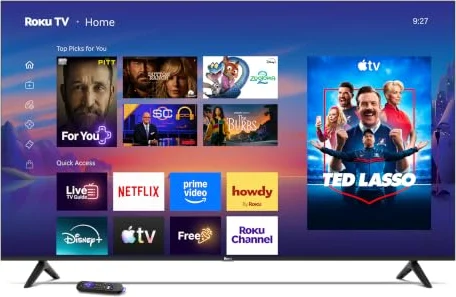
The 2026 Select is a TV you buy for its software: Roku OS and its accessibility tools are the reason to choose it. Its picture is basic, and Tom's Guide measured its HDR brightness as the lowest in its class.
What Changed From the 2025 Select
The 2026 model (65R5D5) replaces the 2025 Roku 65" Select we previously recommended (65R4C5). The change that matters is the screen: the new model is a QLED, using quantum dots for colour, where the old one was a standard LED TV. Almost everything else is the same on paper: a 60Hz panel, a direct-lit backlight with no local dimming, no Dolby Vision, and the same enhanced voice remote with personal shortcuts and a lost-remote finder.
One honest footnote: Roku also sold a QLED Select in 2025 (the R5CX). So the quantum dot screen is new compared with our old pick, not new to Roku.
Ease of Use: The Reason to Buy It
Tom's Guide's reviewer, Sean Captain, called the remote "streamlined without being too sparse", with shortcut buttons for Netflix, Disney+, Apple TV+ and Prime Video and voice search built in. The Roku phone app works as a spare remote. Voice control also works through Siri, Alexa or Google Assistant, and Apple AirPlay lets you send photos and video from an iPhone.
Roku's accessibility tools are a real strength for older viewers or anyone with low vision:
- Screen reader. Press the star (Options) button four times quickly and the TV reads menus aloud. Speech rate and volume are adjustable.
- Volume modes. Leveling evens out loud adverts and jumps between apps; Night mode lifts quiet dialogue and tames explosions.
- Captions switch on from Settings, then Accessibility.
- Bluetooth Headphone Mode sends sound to headphones so others are not disturbed.
The limit to know before you buy: Roku states plainly that text resizing is not available on its TVs. If someone in your home needs bigger menu text, no Roku TV can provide it.
Two caveats from the review. The interface felt "a bit sluggish on this model", and Tom's Guide listed privacy as a concern, noting a Florida attorney general lawsuit against Roku. The home screen also carries personalised recommendations and promoted content.
If the TV is for someone who struggles with menus, set up the home screen yourself: put their few apps first, turn on Leveling in the sound settings, and show them the four-press star shortcut for the screen reader.
Picture: Basic, and Dim in HDR
This is where the Select falls short. Tom's Guide measured about 335 nits on a 10% HDR window in Movie mode, which it called "a new all-time low" against similar TVs. Its database average for 65-inch TVs is about 927 nits. In SDR, Standard mode reached about 398 nits. Amazon's own listing gives a maximum brightness of 250 nits.
Colour is the better news: in Movie mode Tom's Guide measured an average colour error (Delta E) of about 2.45, which is accurate for a budget set, and it found fast motion handled respectably. Without local dimming, though, dark scenes will look greyish rather than black, and HDR films lack the highlights that make HDR worthwhile. The screen is glossy, so a bright room makes it harder still.
Tom's Guide gave it 2.5 out of 5, calling poor brightness "the dealbreaker", and pointed buyers who care about picture to Mini-LED alternatives such as the TCL 65" QM6K.
Sound, Gaming and Connections
Sound was a pleasant surprise for the class. The TV has two 10-watt speakers with Dolby Audio (no Dolby Atmos), and Tom's Guide praised "spacious audio for this TV class". Roku says the Select is tuned for clear speech.
For gaming it is limited: 60Hz and HDMI 2.0 mean a PS5 or Xbox Series X runs at 4K/60 at most. Input lag is low at 9.6ms (Tom's Guide), so casual play is comfortable.
- Four HDMI 2.0 inputs, one with eARC for a soundbar (Tom's Guide hands-on).
- One USB port, optical audio out, Ethernet and an antenna input with an ATSC 1.0 tuner (no NextGen TV).
- Bluetooth 5.2; feet-style stand; VESA 400 x 300 for wall mounting; about 30 pounds without the stand.
- A one-year parts and labour warranty, as on all Roku-made TVs.
Strengths
- ✓Roku OS: simple home screen and remote, with a screen reader you toggle by pressing the star button four times
- ✓Accurate colour in Movie mode for a budget TV (Tom's Guide: Delta E about 2.45)
- ✓Four HDMI inputs, Apple AirPlay and Bluetooth Headphone Mode
Cons
- ✗Very dim HDR: Tom's Guide measured about 335 nits, a new low for its class
- ✗60Hz with no local dimming, no Dolby Vision and no HDMI 2.1
- ✗Roku says on-screen text cannot be resized
Alternatives Worth Considering
- TCL 65" QM6K: a Mini-LED with local dimming and 144Hz, for far better HDR and gaming, on Google TV instead of Roku. See our QM6K review.
- Roku 65" Pro Series: keeps Roku OS but adds a Mini-LED backlight with local dimming, 120Hz, Dolby Vision IQ and a backlit, rechargeable remote with hands-free voice. See our Roku Pro review.
- Sony BRAVIA 3 II: Tom's Guide measured it at about 520 nits on the same HDR test and said it "completely outperforms" the Select, with 120Hz and four HDMI 2.1 ports, on Google TV. Read our 55-inch BRAVIA 3 II review.
Who Should Buy It, and Who Shouldn't
Buy it if the person using it values a simple interface above all, watches mostly news, sport, cable channels and streaming in SDR, does not game seriously, and would benefit from Roku's screen reader and volume levelling.
Look elsewhere if you watch HDR films, your room is bright, you want 120Hz gaming, or someone needs larger on-screen text. For simplicity with a much better picture, the Roku Pro Series is the step up within Roku's own range.
Frequently Asked Questions
What changed from the 2025 Roku Select?
The main change is the panel: the 2026 Select Series (65R5D5) uses a QLED (quantum dot) screen, where the 2025 Select 4K we previously recommended (65R4C5) was a standard LED TV. It is still a 60Hz TV with no local dimming, and the remote is the same enhanced voice remote. Roku did also sell a QLED Select in 2025, so the QLED panel is new compared with our old pick rather than new to Roku.
Is the Roku Select good for elderly parents?
For ease of use, it is one of the better choices: Roku's home screen is simple, and a screen reader that reads menus aloud switches on by pressing the star (Options) button four times quickly. Leveling and Night volume modes help keep dialogue audible. One limit to know: Roku states that text resizing is not available on its TVs, so menu text cannot be made bigger.
How bright is the 2026 Roku Select?
Not very. Tom's Guide measured about 335 nits on a 10% HDR window in Movie mode and called it a new all-time low against similar TVs; its average for 65-inch TVs is about 927 nits. In Standard mode SDR reached about 398 nits. It is fine for everyday TV in a room with modest light, but HDR films lack punch.
Is the Roku Select good for gaming?
Only for casual play. It is a 60Hz TV with HDMI 2.0 ports, so a PS5 or Xbox Series X is limited to 4K at 60fps. Input lag is low, though: Tom's Guide measured 9.6ms.
Does it support Dolby Vision or HDR10+?
There is no Dolby Vision. Roku and Amazon list HDR10+, but Tom's Guide's review lists only HDR10 and HLG, so HDR10+ support is not independently confirmed.
Final Verdict
The 2026 Select is a TV you buy for its software: Roku OS and its accessibility tools are the reason to choose it. Its picture is basic, and Tom's Guide measured its HDR brightness as the lowest in its class.
For a parent's living room, a kitchen or a bedroom where ease of use matters more than film-night picture quality, it does its job. If picture quality matters to you at all, spend a little more on a Mini-LED.
Sources
This review is based on the manufacturer's published specifications and support documents, Amazon's product listing, and the lab review below. We have not tested the TV ourselves; where a figure comes from a specific reviewer, it says so.
- Tom's Guide, Roku 65" Select Series 4K QLED TV review, Sean Captain (65R5D5)
- Roku Support, Roku-branded TV product information (line-up and specs)
- Roku Support, Accessibility on the Roku platform
- Roku Support, Volume modes (Leveling and Night)
- Roku 2025 Roku-made TV line-up press release (syndicated copy)
- Amazon listing and spec table, Roku 65" Select Series 2026 (65R5D5)