Roku 55" Select Series Smart TV (2025) Review 2026
The simplest TV you can buy. Roku OS trades raw specs for an interface your parents can actually use.
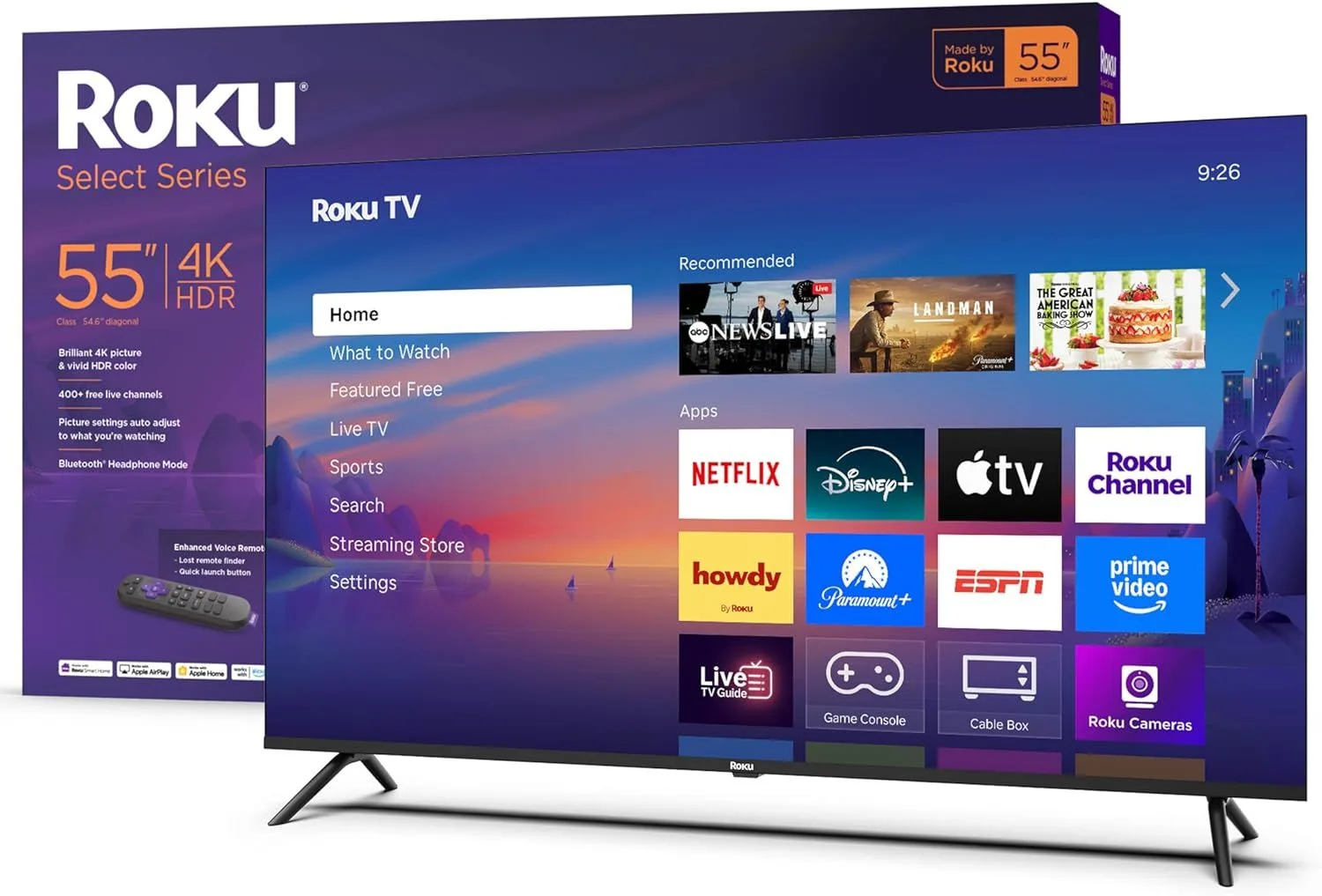
Roku's Select Series trades raw specs for the simplest TV experience available. If you find Fire TV confusing or Google TV overwhelming, this is your TV.
Software Over Specs
Every TV at this price has a similar LED panel, similar brightness, similar viewing angles. The thing that actually differs between a Roku, a Fire TV, and a Google TV is the software you interact with every single day. And Roku's software is the best.
That is a bold claim, so here is the evidence: Roku OS presents a clean grid of your apps. No rotating ad banner consuming the top third of your screen. No "suggested" content pushing Amazon originals you did not ask for. No Google TV's algorithm deciding what you should watch based on your search history. Just your apps, in order, ready to launch.
Hand a Roku remote to someone who is not tech-savvy. They will figure it out in minutes. Hand them a Fire TV remote and they will accidentally trigger Alexa three times before finding Netflix. Roku wins the parent test every time.
The Apple Bonus
AirPlay 2 and HomeKit support at this price is unusual. If your household uses iPhones, this means casting photos, videos, and music from any Apple device without needing an Apple TV box. You can mirror your iPad screen for a quick presentation or share vacation photos on the big screen.
HomeKit integration lets you add the TV to the Apple Home app. "Hey Siri, turn off the TV" works. For Apple households, this is useful and saves the cost of a separate streaming device.
The Trade-Offs
Simplicity has a cost. No Dolby Vision. HDR10 and HLG only, which means streaming content that is mastered in Dolby Vision falls back to standard HDR. The Toshiba C350 handles Dolby Vision at a similar price.
The app selection on Roku OS is broad but not quite as deep as Google TV's ecosystem. Most mainstream apps are present. Niche apps or newer services sometimes arrive on Roku later than competing platforms.
Strengths
- ✓Roku OS is the cleanest, most intuitive smart TV platform
- ✓No aggressive ads like Fire TV
- ✓Apple AirPlay and HomeKit support
Cons
- ✗Basic LED panel with limited brightness
- ✗60Hz with no gaming features
- ✗Fewer apps than Google TV ecosystem
A Week with Roku
After a week of daily use, the thing that stands out is what does not happen. No accidental Alexa triggers. No full-screen ad loading when you power on. No "continue watching" suggestions from services you tried once. The TV turns on, shows you your apps, and gets out of the way.
The picture quality is unremarkable. It is a basic LED panel like every other TV at this price. But when has anyone chosen their daily-driver TV based on a spec sheet? The interface is what you interact with every time you pick up the remote, and Roku's is the least annoying.
The Verdict on Value
At Under $300, the Roku 55" Select costs slightly more than the Insignia Fire TV and roughly the same as the Toshiba C350. You are paying for software quality, not hardware quality. If you want the least frustrating TV experience available at this size, Roku delivers it. If you want the best picture at this price, the Toshiba's Dolby Vision is the better investment.
Frequently Asked Questions
Is Roku OS really simpler than Fire TV?
Yes, noticeably. Roku OS organizes everything into a clean grid of app tiles. No rotating banner ads, no sponsored rows pushing content you did not ask for. The settings are straightforward and the remote has dedicated streaming buttons. Older family members consistently find Roku easier to use than any other platform.
Does the Roku 55" Select support Apple AirPlay?
Yes. AirPlay 2 and HomeKit are built in. You can cast from an iPhone, iPad, or Mac directly to the TV. You can also add the Roku to the Apple Home app for voice control via Siri. This is unusual at this price point.
Why doesn't the Roku 55" Select have Dolby Vision?
Roku's Select Series targets simplicity and affordability. Dolby Vision licensing adds cost, and Roku chose to keep the price low. The TV supports HDR10 and HLG, which covers most streaming content. If Dolby Vision matters, the Toshiba C350 is the budget alternative.
Can the Roku Select Series use external streaming devices?
Yes. The 3 HDMI ports work with any Roku stick, Fire Stick, Apple TV, or Chromecast. But the built-in Roku OS makes an external device unnecessary for most people. The whole point of this TV is that you do not need extra hardware.
How does the Roku remote compare to Fire TV's?
The Roku remote is simpler with fewer buttons and a clean layout. It has dedicated buttons for major streaming services (which vary by model). No microphone button for always-listening voice assistants unless you want it. Fire TV's remote pushes Alexa more aggressively.
Final Verdict
Rating: 4.2/5
Roku's Select Series trades raw specs for the simplest TV experience available. If you find Fire TV confusing or Google TV overwhelming, this is your TV.
Buy it for the interface. Skip it if Dolby Vision matters more than software simplicity.
Track the Roku 55" Select
We check the price daily and monitor availability. You hear from us when something changes.
Only when something changes. Unsubscribe anytime.