HDR Formats Explained: Dolby Vision vs HDR10+
HDR is the single biggest picture quality upgrade since the jump to 4K resolution. But the format wars — Dolby Vision, HDR10, HDR10+, and HLG — create real confusion at the point of purchase. Which formats matter? Which TV brands support which? And does your streaming service even offer HDR content? Here is the clear, technical answer.
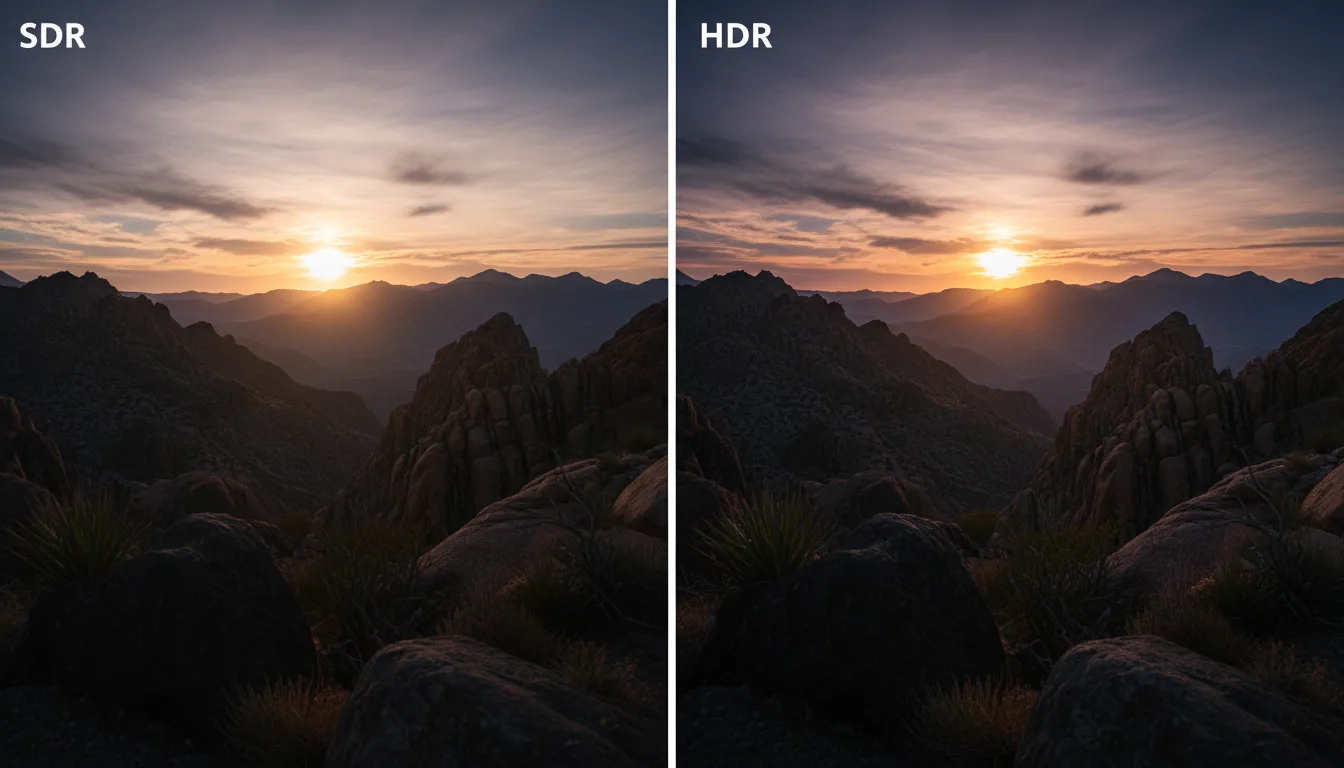
What HDR Actually Does to Your Picture
Standard TV content (SDR) was designed for screens that max out around 100 nits of brightness. HDR content is mastered for displays that can hit 1,000 nits or more. This expanded range produces three visible improvements:
- Brighter highlights — Sunlight glinting off water, explosions, neon signs actually look bright and intense rather than flat white
- Deeper shadows — Dark scenes retain visible detail instead of collapsing into a black blob
- Wider color — HDR uses the BT.2020 color space (or DCI-P3 subset), covering billions of colors versus the millions in SDR's BT.709 standard
The catch: your TV needs sufficient brightness and color capability to actually deliver these improvements. An HDR signal on a 250-nit budget TV is like playing a 4K Blu-ray on a 720p projector — the source is better, but the display cannot show it.
The brightness threshold for real HDR impact: Below 400 nits peak brightness, HDR content looks nearly identical to SDR. Between 400-700 nits, highlights start to pop noticeably. Above 800 nits, HDR is genuinely impressive. Above 1,200 nits, HDR is stunning. Most budget TVs sit around 250-350 nits — technically HDR-compatible but visually unchanged.
The Four HDR Formats, Ranked
1. Dolby Vision — The Gold Standard
Dolby Vision uses dynamic metadata — brightness and color instructions that change scene-by-scene or frame-by-frame. A dark cave scene gets different tone mapping than a bright outdoor scene within the same movie. This produces the most accurate representation of the filmmaker's intent on whatever display you own.
- Bit depth: 12-bit (vs 10-bit for HDR10/10+)
- Max brightness: Supports up to 10,000 nits
- Metadata: Dynamic (per-scene or per-frame)
- Content library: Netflix, Disney+, Apple TV+, Vudu, Amazon Prime Video, 4K Blu-ray
- TV support: LG, Sony, TCL, Hisense, Roku, Amazon Fire TV, Vizio. NOT Samsung.
Samsung is the only major TV brand that does not support Dolby Vision on any TV model. Samsung backs HDR10+ exclusively. If Dolby Vision content from Netflix and Disney+ is important to you, this eliminates all Samsung TVs from consideration — regardless of how good their panels are. This is a deal-breaker for many home theater enthusiasts.
2. HDR10+ — Samsung's Dynamic Alternative
HDR10+ is Samsung's response to Dolby Vision. It adds dynamic metadata on top of the base HDR10 standard, providing scene-by-scene brightness adjustment similar to Dolby Vision. The key difference: Dolby Vision is a licensed standard with strict hardware requirements. HDR10+ is royalty-free and open, which is why Samsung prefers it.
- Bit depth: 10-bit
- Max brightness: Supports up to 4,000 nits
- Metadata: Dynamic (per-scene)
- Content library: Amazon Prime Video, some Paramount+ titles, Samsung TV+. Much smaller than Dolby Vision.
- TV support: Samsung, Hisense, TCL, Amazon Fire TV, Roku
The practical problem with HDR10+ is content availability. Dolby Vision is supported by virtually every major streaming service. HDR10+ is primarily limited to Amazon Prime Video and Samsung-partnered content. Many TVs support both, which is the ideal scenario.
3. HDR10 — The Universal Baseline
HDR10 is the foundation that all other HDR formats build on. Every HDR TV supports it. Every HDR source produces it. It uses static metadata — one set of brightness/color instructions for the entire movie or show, based on the brightest scene. This means a consistently bright movie maps well, but a film with extreme brightness variation (dark caves + sunlit landscapes) may compromise in one direction.
- Bit depth: 10-bit
- Max brightness: Supports up to 1,000 nits (in practice)
- Metadata: Static (one setting for the entire program)
- Content library: Everything HDR — it is the base layer
- TV support: Universal — every HDR TV supports HDR10
4. HLG — The Broadcast Standard
Hybrid Log-Gamma is designed for live broadcast TV — sports, news, events. Its technical strength is backward compatibility: an HLG signal looks fine on SDR TVs without any special processing. This makes it practical for broadcasters who need one signal to serve both HDR and SDR viewers simultaneously.
- Bit depth: 10-bit
- Metadata: None (embedded in the signal curve)
- Content library: BBC iPlayer, YouTube (some content), live broadcasts
- TV support: Virtually universal on 2020+ TVs
Format Support by Streaming Service
| Service | Dolby Vision | HDR10+ | HDR10 |
|---|---|---|---|
| Netflix | Yes | No | Yes |
| Disney+ | Yes | No | Yes |
| Apple TV+ | Yes | No | Yes |
| Amazon Prime Video | Yes | Yes | Yes |
| YouTube | No | No | Yes |
| 4K Blu-ray | Yes | Some | Yes |
Which Format Should You Prioritize?
The decision tree is simpler than the format wars suggest:
- Dolby Vision + HDR10 — Covers 95% of streaming HDR content. This is the combination most TV buyers should prioritize.
- Dolby Vision + HDR10+ + HDR10 — Ideal. Some TVs (TCL, Hisense, LG, Amazon Fire TV) support all three. No content is left behind.
- HDR10+ + HDR10 only — This is the Samsung path. You lose Dolby Vision content from Netflix and Disney+ (it falls back to HDR10). Acceptable if you specifically want Samsung's ecosystem.
Common HDR Mistakes
1. Assuming "HDR Support" Means Good HDR Performance
A TV can accept HDR10 signals at 250 nits of peak brightness. It processes the metadata but cannot display the expanded dynamic range. The TV label says "HDR" but the experience is barely different from SDR. Always check peak brightness alongside format support.
2. Buying Samsung When Dolby Vision Is Important
This catches people off guard. Samsung makes excellent panels, but the deliberate exclusion of Dolby Vision means Netflix, Disney+, and Apple TV+ content falls back to base HDR10 instead of the superior Dolby Vision grade. If streaming HDR quality is a priority, factor this limitation into your decision.
3. Not Checking HDR Settings After Setup
Many TVs ship with HDR processing set to "auto" or a conservative mode. Enabling Dolby Vision IQ (on LG), or Filmmaker Mode with HDR, can significantly improve the HDR experience. Read our setup and calibration guide for specifics.
4. Confusing HDR With Resolution
4K and HDR are independent features. A 4K SDR TV has high resolution but standard brightness/color. A 4K HDR TV has both. HDR improves picture quality more noticeably than the jump from 1080p to 4K at typical viewing distances.
Our HDR Picks
Best Dolby Vision TV: LG 55" OLED C5
OLED with full Dolby Vision processing, Dolby Vision IQ that adapts to room brightness, and LG's mature webOS platform. The reference-grade HDR experience. Read our review.
Best HDR Brightness: TCL 65" QM7K
Mini-LED with high peak brightness that makes HDR highlights punch through ambient light. Dual format support for Dolby Vision and HDR10+. Read our review.
Best Dual-Format Value: Roku 65" Pro Series
Both Dolby Vision and HDR10+ on a QLED with local dimming at a competitive mid-range price. Covers all HDR bases. Read our review.
Frequently Asked Questions
What is HDR on a TV?
Which HDR format is best?
Does Netflix support Dolby Vision?
Can I see HDR on a budget TV?
What is HLG?
Do I need a TV that supports both Dolby Vision and HDR10+?
See HDR in Action
The best way to evaluate HDR performance is to compare TVs across our reviews, where we assess HDR highlight detail, shadow performance, and tone mapping accuracy for each model. Start with our Mini-LED roundup for the best HDR brightness or our OLED roundup for the best HDR contrast.
Find the best HDR TV for your room
Ranked picks with real HDR brightness and format support details.
See Best Mini-LED TVsReady to Buy? Start Here
Based on this guide, our #1 recommendation:
LG 65" OLED C5 Best Dolby Vision performance — perfect blacks and infinite contrast for HDR content Read Full Review →Can't Decide? Compare Side by Side
Get Our Top 3 Picks
Get our top 3 picks for your budget — one email, then only updates.
Only when something changes. Unsubscribe anytime.